
Adobe Photoshop 27.11
Adobe Photoshop in 2026 is the most AI-packed version ever, with the AI Assisted Editor (Beta), Prompt to Edit, Markup for visual instructions, and a new non-destructive Light adjustment layer. The September update added Enhance Edge for flawless cutouts and the GPT Image 2 model for more precise edits. Pricing starts at $22.99/month for Photoshop alone, $19.99/month for the Photography plan (Photoshop + Lightroom), and $69.99/month for the full Creative Cloud suite. A 7-day free trial is available, plus a new freemium option with limited daily AI generations. GIMP 3.2.4 remains the best free alternative, capable enough for many users but still lacking Photoshop's deep professional polish. Photoshop is still the king, but the subscription model and AI credits mean you're paying more than ever for the privilege.
- Free trial
- Windows
- macOS
- Nov 8, 2026
Screenshots
About Adobe Photoshop
Adobe Photoshop Download, Professional Image Editing Software
TL;DR Quick Take / Who is this for?
Adobe Photoshop is the most powerful image editing application available, and the 2026 release (version 27.x) reinforces that position with generative AI features that have no real equal in competing software. It handles everything from basic photo correction to complex layer-based compositing, digital painting, and typography, and it supports an enormous range of raw camera files, print formats, and third-party plug-ins. PCMag awards it an "Exemplary" rating and describes it as "the most powerful image editing software available," highlighting its vast toolset, cutting-edge generative AI, and a slick interface that has become more manageable in recent versions thanks to a clear Home screen, hover-over help tips, and a persistent search box. The trade-offs are equally clear. Photoshop is subscription-only, with the single-app plan starting at $22.99 per month on an annual, billed-monthly commitment. It is resource-hungry, it runs many processes in the background, and the learning curve for advanced compositing and design work is steep. User reviews are overwhelmingly positive on capability, Capterra shows a 4.8 average from nearly 2,500 reviews, but Trustpilot tells a very different story at 1.1 out of 5, driven by billing and cancellation complaints. Photoshop is the right pick for photographers, designers, and digital artists who need the industry standard and are prepared to pay for it. It is not the best choice for casual users, budget-conscious creators, or anyone who wants a perpetual license.
Quick Info Box
| License Type | Subscription only (Single App from $22.99/mo annual, billed monthly; Photography plan includes Lightroom and 1 TB storage) |
|---|---|
| File Size | Installer approx. 3.5 MB (downloads components during setup); installed footprint around 10 GB |
| OS Compatibility | Windows 11 (23H2, 24H2) and Windows 10 (21H2 LTSC, 22H2); macOS 13 Ventura or later |
| Latest Version | 27.x (2026 release) |
| Developer | Adobe Inc. |
Key Features & Real-World Usability
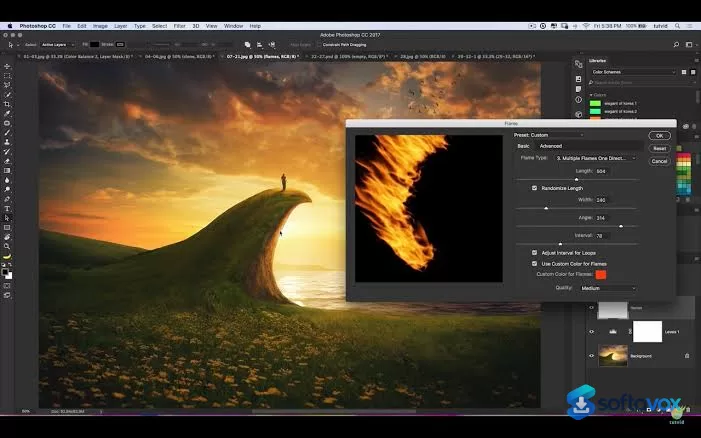
Photoshop's feature set is built around layers, and that architecture remains the foundation of everything the software does. Every adjustment, filter, mask, and effect exists on a non-destructive layer, so you can experiment without permanently altering the original image. The 2026 release adds generative AI capabilities for image creation, editing, object removal, and selection, and these tools are genuinely useful rather than gimmicks, they speed up tasks that previously required hours of manual masking and cloning. The drawing, filter, gradient, masking, shape, and text tools that professional designers rely on are all present and mature, and the raw camera file support is excellent. The interface has improved in recent versions. A clear Home screen gets you started, hover-over help tips explain unfamiliar controls, and a persistent search box at the top lets you find tools and commands by name. The software also integrates with Cloud Documents, collaboration features, and Synced Libraries, making it practical for teams that share assets and review work across devices. Third-party plug-ins extend the feature set further, covering everything from noise reduction to specialized retouching workflows. The limitations are consistent with a legacy-grade professional tool. Photoshop runs many processes in the background, and reviewers note that it "will confidently make an expensive computer fan sound like a jet engine taking off". Memory consumption is high, and some recent update changes have made saving files out "a bit more convoluted". The learning curve for advanced compositing, digital painting, and logo design is steep, with reviewers noting that these features need "extra assistance and training time to work with".
- Layer-based non-destructive editing: Every adjustment, mask, and effect lives on its own layer, so you can refine and revise without destroying the original image.
- Generative AI tools: Create and edit images, remove objects, and make selections using AI, saving hours of manual masking and cloning work.
- Comprehensive retouching and correction: Content-Aware Fill, healing brushes, clone stamp, and a full suite of color and tone adjustments for professional photo work.
- Digital painting and typography: Rich brush engine, shape tools, and font management for creating graphics, logos, and digital art from scratch.
- Excellent raw camera support: Opens and processes raw files from major camera manufacturers, with built-in camera profiles and lens corrections.
- Cloud Documents and collaboration: Save work to the cloud, share with collaborators, and access Synced Libraries for consistent assets across projects.
- Third-party plug-in ecosystem: Extend functionality with a vast library of plug-ins for noise reduction, retouching, texture generation, and specialized workflows.
- Improved interface guidance: Home screen, hover-over help tips, and persistent search box make the toolset more discoverable than in earlier versions.
Pros, Cons & Community/User Feedback
User sentiment around Photoshop is split between glowing product reviews and scathing billing complaints, and the gap is unusually wide. On Capterra, the software holds a 4.8 average from 2,469 reviews, with ease of use at 4.2 and customer service at 4.3. Reviewers describe it as "the gold standard of photo editing software," praise the ability to add preset actions, and highlight that it "gives you complete control, from basic adjustments like brightness and contrast to advanced tasks like layer-based compositing, retouching, and digital painting". One long-term user simply calls it "the most indispensable tool in a graphic design industry". The positives are consistent: Photoshop is the most capable image editor available, the layer system is unmatched, and the AI features genuinely save time. The complaints fall into three categories. First, pricing and subscription: reviewers note that "the Creative Cloud subscription model costs small organizations too much to implement," and that "Adobe's shift to a subscription-only model was the biggest drawback". Second, performance and resource use: users report that the software "does take up a lot of memory," that "some of the recent update changes have made saving files out a bit more convoluted," and that it makes "an expensive computer fan sound like a jet engine taking off". Third, specific tool limitations: some users report that background removal "can not work" reliably, and that logo design and graphic features are "too tricky to use, needing extra assistance and training time". Trustpilot paints a much darker picture, with a 1.1 out of 5 rating driven by complaints about billing, cancellation fees, and customer support, the 50% early termination fee on annual plans is a recurring source of anger. The practical takeaway is that Photoshop's editing capabilities are best-in-class, while its subscription cost, resource demands, and billing practices are the areas where user frustration is most acute.
Pros
- Most powerful and comprehensive image editor available
- Layer-based non-destructive editing with an unmatched toolset
- Cutting-edge generative AI features for creation, editing, and object removal
- Excellent raw camera file support and print-format compatibility
- Vast third-party plug-in ecosystem for specialized workflows
- Cloud Documents, collaboration, and Synced Libraries for team workflows
- 4.8 average rating from nearly 2,500 Capterra reviews
- Interface improvements including Home screen, help tips, and search
Cons
- Subscription-only model with no perpetual license option
- High memory and CPU consumption; runs many background processes
- Steep learning curve for advanced compositing, painting, and design work
- Recent updates have made saving files more convoluted according to users
- Trustpilot rating of 1.1/5, driven by billing and cancellation complaints
- 50% early termination fee on annual plans cancelled after 14 days
- Background removal and logo design tools can be unreliable for some users
- Expensive for small organizations and casual users
Final Verdict & Safe Download Advice
Adobe Photoshop remains the benchmark for professional image editing, and the 2026 release strengthens its position with AI tools that solve real problems rather than chasing trends. If you are a photographer, graphic designer, or digital artist whose work depends on layers, precise masking, and the broadest possible toolset, Photoshop is the standard for good reason, and nothing else matches its depth. The layer system is the foundation of modern digital imaging, and the generative AI features extend that foundation into territory that was previously reserved for specialists. The caveats are significant. The subscription never ends, the software is resource-hungry, and the billing practices have generated a level of user anger that is rare even in the subscription software market. If you need the full power of Photoshop and you use it professionally, the cost is justifiable. If you are a casual user, a hobbyist, or a small team on a tight budget, Affinity Photo offers a compelling one-time-purchase alternative, and free tools like GIMP or Photopea cover basic editing without the subscription. For everyone else, Photoshop is the industry standard, and the 2026 release delivers what professionals need, provided you are prepared to pay for it and invest the time to learn it.
- Download only through the Adobe Creative Cloud desktop app: Adobe applications are digitally signed and distributed through Adobe's official servers. Downloading Photoshop from third-party sites or "cracked" sources is a common malware vector. The Creative Cloud app is the only safe source for the installer.
- Verify the installer and version: The installer is approximately 3.5 MB (it downloads components during setup), and the installed footprint is around 10 GB. The current version is 27.x for the 2026 release. A dramatically smaller file claiming to be Photoshop is a warning sign.
- Check system requirements before subscribing: Photoshop requires Windows 11 (23H2 or 24H2) or Windows 10 (21H2 LTSC or 22H2) on the Windows side, or macOS 13 Ventura or later. It needs 8 GB of RAM minimum (16 GB recommended), a GPU with DirectX 12 support and 1.5 GB of VRAM, and 10 GB of free disk space (100 GB on a fast SSD recommended for scratch disks).
- Use the free trial to test performance on your hardware: Adobe offers a seven-day free trial. Use it to confirm that Photoshop runs acceptably on your machine, particularly if you work with large files or heavy layer stacks, before committing to a subscription.
- Be aware of the cancellation terms: Annual plans are billed monthly but require a one-year commitment. Cancelling after 14 days incurs a fee of 50% of the remaining contract value. If you are unsure about long-term use, the monthly plan without an annual commitment costs more per month but offers more flexibility.
- Do not download "cracked" or "pre-activated" versions: Photoshop is subscription-only, and cracked installers are a primary vector for malware and credential theft. The official trial and subscription are the only safe options.
Similar software






Key features
- Adobe Photoshop 2026 (version 27.x), professional image editing software and industry standard
- Layer-based non-destructive editing, adjustments, masks, filters, and effects on separate layers
- Generative AI tools, create/edit images, remove objects, and make selections with AI assistance
- Comprehensive retouching, Content-Aware Fill, healing brushes, clone stamp, and full colour/tone adjustments
- Digital painting and typography, rich brush engine, shape tools, and font management for graphics and digital art
- Excellent raw camera support, opens raw files from major camera makers with built-in profiles and lens corrections
- Cloud Documents and collaboration, save to cloud, share with collaborators, and use Synced Libraries
- Third-party plug-in ecosystem, extend functionality for noise reduction, retouching, texture, and specialised workflows
- Improved interface guidance, Home screen, hover-over help tips, and persistent search box
- Subscription model, Single App from $22.99/month on annual, billed-monthly commitment; Photography plan includes Lightroom and 1 TB storage
- Platforms, Windows 11 (23H2/24H2) and Windows 10 (21H2 LTSC/22H2); macOS 13 Ventura or later
- Installer size, approx. 3.5 MB (downloads components during setup); installed footprint around 10 GB
Frequently asked questions about Adobe Photoshop
Is Photoshop safe to download?
Is Photoshop free?
What systems does Photoshop run on?
What is Photoshop used for?
How does Photoshop compare to GIMP?
How do I update or uninstall Photoshop?
Versions
| Version | Release date | Platform | File size | |
|---|---|---|---|---|
| Adobe Photoshop 27.11 Latest version | Oct 5, 2026 | Windows | 5.9 GB | Download |
Comments about Adobe Photoshop
No comments yet. Share your experience with this program!